
Using reCAPTCHA on Salesforce Web-to-Lead Forms

How to setup Salesforce Lightning for Outlook
April 17, 2017
Terry’s Tips: Salesforce 2019 Winter Release Highlights You Will Love
November 14, 2018
| Applies to: Lightning and Classic |
Tired of getting spam from your Salesforce Web-to-Lead form? The Web-to-Lead option provides us an easy method for adding new Lead from our website visitors but when those leads are junk, it can become frustrating. Let’s learn how we can prevent this problem.
You’ve likely seen web forms that have some sort of “I’m not a robot” challenge that is required to submit a form. This is called reCAPTCHA. reCAPTCHA is a service that protects our websites from spam. It uses random methods that prevent automated bots from creating havoc on our sites while making it easy for humans to solve.
Since the Winter 2017 Salesforce Release, we have the ability to add this functionality to our Web-to-Lead forms. Let’s look at the steps to set this up.
How to setup reCAPTCHA on Salesforce web-to-lead forms
First, we need to create reCAPTCHA API keys for our website. To do this click here to open Google’s reCAPTCHA site. If you’re not already logged into your Google account, you’ll want to login.
You’ll see a page like the one shown below.
- Enter the Label. I’d recommend a user friendly name that references your website.
- Select the reCAPTCHA V2 radio button
- Enter your website’s domain in the Domains box. If you have multiple sites, you can enter each domain on separate lines.
- Check the Accept the reCAPTCHA Terms of Service
- Press the Register button

Google then generates your API keys and displays them. The page will have a lot of information on it but you’re looking for the Site Key and Server Key, as shown below. Leave this page open or copy this keys and store them somewhere safe.

Now we’re ready to do the setup in Salesforce. Open a new tab in your browser and log into Salesforce and go to Setup.
- In the Setup Quick Find, type User Interface and select it from the menu
- Check the Show Quick Create checkbox and Save the change. Yes, I know this is close to an unforgivable sin to turn on but we’ll have to do this so we can add the API Keys in a later step. WE WILL turn it back off!
- In the Setup Quick Find, type Web-to-Lead and select if from the menu

- Be sure you have Web-to-Lead Enabled. If not, be sure you configure and enable it.
- Now, for the fun part. Press the Create Web-to-Lead Form button.
- Select the fields to include on your Web-to-lead form.
- Add a Return URL. Often this is some form of thank you for submitting the form page.
- Check the Enable spam filtering (recommended) checkbox
- Press the Lookup icon next to the reCAPTCHA API Key Pair field.
- Press the New button on the Lookup screen. If you don’t see the New button, go back and check the Show Quick Create checkbox in the User Interface.
- Enter the API Key Pair Nickname
- Enter the Site Key
- Enter the Secret (key)
- The screen should look something like the image below. If so, press Save

- You should be back on the Web-to-Lead Setup page and your new reCAPTCHA key is listed. Press Generate

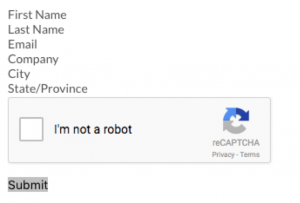
Salesforce has generated the HTML code needed for your new web form with reCAPTCHA protection. Provide this code to your webmaster to add to your website. This HTML code is not branded to your site so your webmaster will want to add styling so it looks like it belongs on your site. Below is what it will look like without styling, so it’s not pretty in its raw form but you can see how the reCAPTCHA displays.
Using reCAPTCHA on Salesforce web-to-lead forms is a simple process and can help keep your Lead data clean. Give it a try and be sure to follow my blog and social accounts for more helpful tips. If you need addition help with this or other Salesforce issues, be sure to reach out.


